Who we are

TrackSync was built in a real edit room, not in a feature checklist.

We are Mottygo s.r.o., a production company based in Prague, Czech Republic. TrackSync grew out of our own move from Premiere Pro and PluralEyes to DaVinci Resolve.

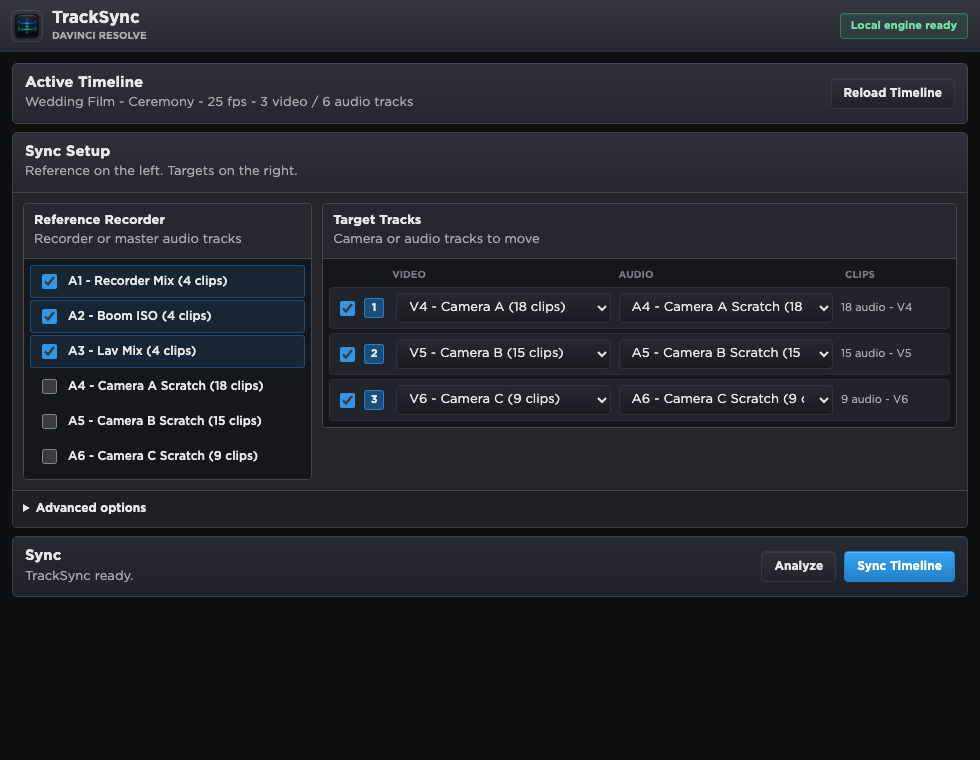
TrackSync setup screen inside the DaVinci Resolve workflow integration.
TrackSync inside the Resolve workflow integration, using recorder tracks as references and camera audio as targets.
10 years in Premiere Pro Our sync habits were shaped by everyday production work, not a lab demo.
PluralEyes was part of the workflow For years, external audio sync was simply something we expected to have.
Resolve needed a native answer We wanted to stay inside DaVinci Resolve instead of exporting timelines out.

The switch

Moving to Resolve solved a lot. Sync became the missing piece.

After years of editing in Premiere Pro, we moved our production workflow to DaVinci Resolve for the same reasons many small studios do: better grading, a stronger all-in-one post-production environment, and a cleaner path from edit to final delivery.

The problem was audio sync. We had spent roughly a decade with Premiere Pro and PluralEyes in our muscle memory. Once we moved to Resolve, we started looking for something that felt equally direct for multicamera and recorder audio.

What we wanted

  • Open the active Resolve timeline and sync it directly.
  • Use recorder tracks as strong references for camera scratch audio.
  • Avoid exporting XML, AAF, or FCPXML just to get clips aligned.
  • Create a new synced timeline so the original edit stays untouched.
  • Keep analysis local on the Mac, because production media should stay local.

Why we built it

We found options, but not the workflow we wanted.

Syncaila is a capable standalone sync application, but for our Resolve workflow it still meant leaving the timeline, exporting an interchange file, syncing outside Resolve, and bringing the result back. That kind of roundtrip can work, but it adds friction exactly where we wanted less of it.

We were not trying to build a universal sync suite for every editing program. We needed a practical Resolve-first tool: choose reference tracks, choose target camera tracks, analyze the matches, and create a new synced timeline from the project already open in front of us.

So we built TrackSync for our own projects first. The public version is simply the result of turning that internal tool into something other Resolve editors can use too.

Inside the tool

A compact Resolve-style interface for one job: sync the timeline.

TrackSync is intentionally focused. It does not ask you to rebuild your project in another app. It reads the timeline, lets you confirm the sync setup, and shows the result before the new synced timeline is created.

TrackSync setup screen showing reference recorder tracks and target camera tracks.
Select recorder references and camera targets inside the plugin.
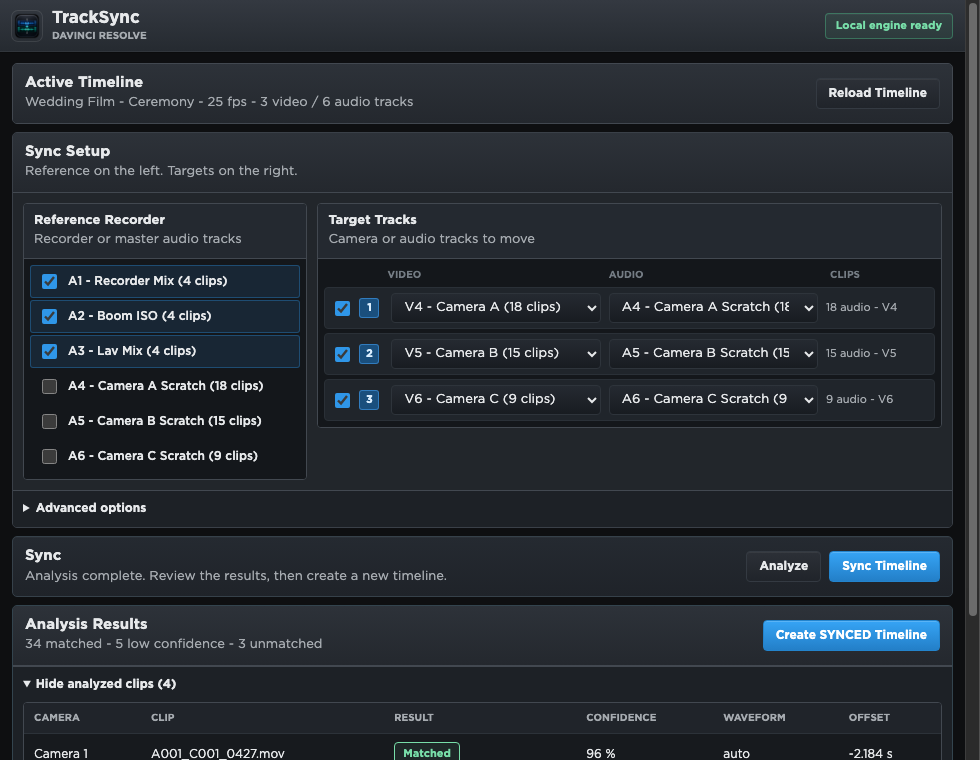
TrackSync results screen showing matched and low confidence clips.
Review match confidence and offsets before creating the synced timeline.

What makes TrackSync different for us

  • It is native to Resolve workflow: open it from Workflow Integrations and work with the active timeline.
  • It removes export gymnastics: no XML/AAF sync detour just to align camera clips.
  • It matches how productions are recorded: recorder tracks can be used together as a stronger reference.
  • It is cautious with your timeline: weak matches are visible and the original timeline is preserved.
  • It is affordable by design: one perpetual license, no subscription, because this is a utility we wanted to own.

Built for our own edits

We use TrackSync on the same kind of material it is made for.

TrackSync is not a side experiment detached from production. It was shaped around the kind of jobs where a small studio needs to move quickly: interviews, music-driven shoots, multicamera setups, camera scratch audio, and separate recorder tracks that need to land in the right place before the edit can really begin.

If you are a Resolve editor who misses the speed of a dedicated sync tool, but does not want to send the timeline through a separate application, TrackSync was made for exactly that gap.

Made by Resolve users, for Resolve users.

TrackSync is our answer to the sync workflow we wanted after moving our production work to DaVinci Resolve.

Buy TrackSync for €10.99