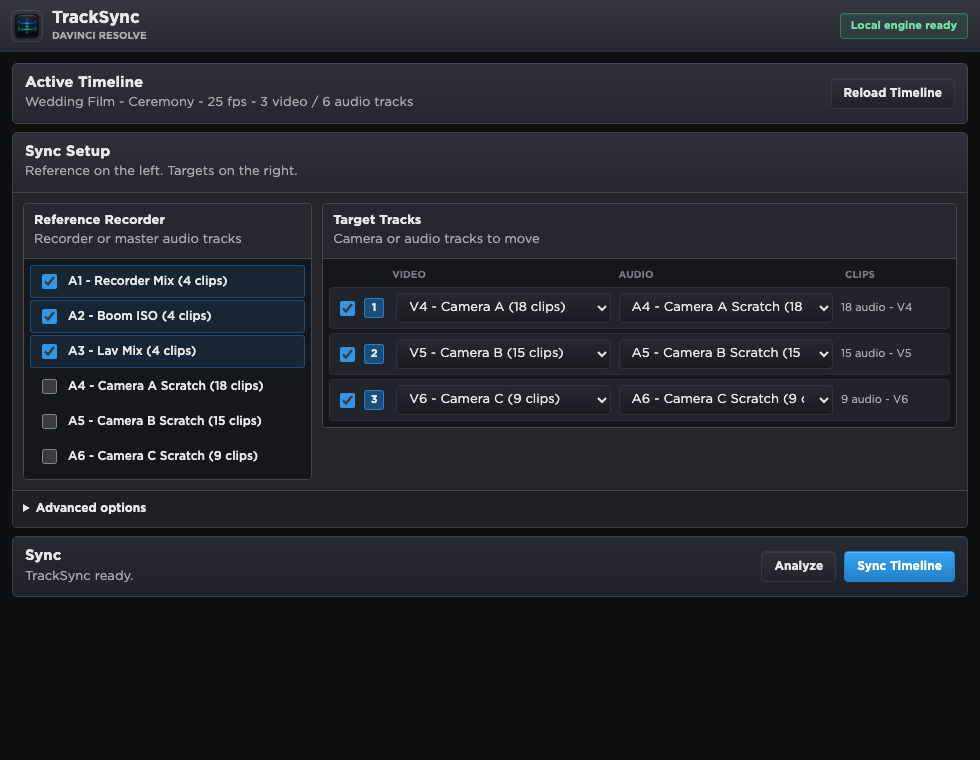
TrackSync reads the timeline currently open in Resolve.
Native DaVinci Resolve audio sync
TrackSync for DaVinci Resolve
Sync audio with video from the active timeline. No XML exports. No subscription.
TrackSync aligns camera scratch audio to recorder tracks directly inside Resolve and creates a new synced timeline, leaving your original edit untouched.
Native Resolve plugin
No XML or AAF roundtrip
Perpetual license
Apple Developer ID signed
Workflow
Inside Resolve
Timeline
Original untouched
Media
Processed locally
License
Perpetual
Workflow
Three steps, all inside DaVinci Resolve.
TrackSync is built around the edit you already have open, so sync does not become a separate export/import job.
Use recorder tracks as reference and camera scratch audio as targets.
TrackSync builds a new synced version and leaves the source timeline intact.
What changes
Less roundtrip management. More editing.
Typical external sync workflow
- Export XML, AAF, or FCPXML from Resolve.
- Open a separate sync application.
- Import the result and check what changed.
- Repeat if the timeline changed during editing.
TrackSync workflow
- Open TrackSync from Workflow Integrations.
- Select recorder references and camera targets.
- Review confidence for weak matches.
- Create a new synced Resolve timeline.
Why it fits Resolve
Focused on one practical job.
Native Resolve support
Runs as a DaVinci Resolve Workflow Integration and works from the active timeline.
No XML roundtrip
Skip interchange files and timeline translation checks just to sync audio with video.
Multiple recorder tracks
Use several recorder tracks together as a stronger sync reference.
Timeline-safe result
Creates a new synced timeline and keeps uncertain matches visible for review.
Local processing
Media, waveform cache, and sync analysis stay on your Mac.
Perpetual license
Pay once and keep using your purchased TrackSync version.
Perpetual license
Buy TrackSync once. Use it without a subscription.
Includes the macOS Apple Silicon build, Apple Developer ID signed installer, and license key delivered to your checkout email.
€10.99 or $11.99
Buy TrackSync for DaVinciFAQ
Basic questions before you buy.
What is TrackSync?
A native DaVinci Resolve Workflow Integration that syncs camera scratch audio with separate recorder audio from your active timeline.
Do I need to export XML or AAF?
No. TrackSync works inside Resolve, so there is no XML, AAF, or FCPXML round trip just to sync audio with video.
Is it a subscription?
No. TrackSync is sold as a perpetual license for the purchased version. Buy it once, use that version without a monthly plan.
What does it require?
Apple Silicon Mac and DaVinci Resolve Studio 20.3 or newer.
Will it change my original timeline?
No. TrackSync creates a new timeline with a synced suffix, so the original stays intact.
Does it upload my media?
No. Audio analysis runs locally on your Mac. Media, waveform cache, and Resolve timeline data are not uploaded.
What if a clip does not sync cleanly?
TrackSync keeps weak matches visible instead of moving them blindly, so you can review low-confidence clips before using the synced timeline.
Is the installer signed?
Yes. The macOS build is signed with an Apple Developer ID certificate so macOS can verify the developer identity.